
Connect to your Space via SFTP using Transmit (macOS)
Transmit is a macOS-only file transfer application by Panic Inc. and is perfect for uploading/downloading to your SiteRig Cloud Space.
- Start by clicking on Quick Connect and entering the following details into the fields available:
- Protocol: SFTP
- Address: your-server-name.your-data-centre.siterig.net
- Port: 22
- User Name: your-username
- Password: your-password
- Remote Path: ~/apps/your-space-name/public (this is optional, but will take you straight to the web root if set)
-
You can then click Add to Servers to save it for future connections, and then Connect to test it works.
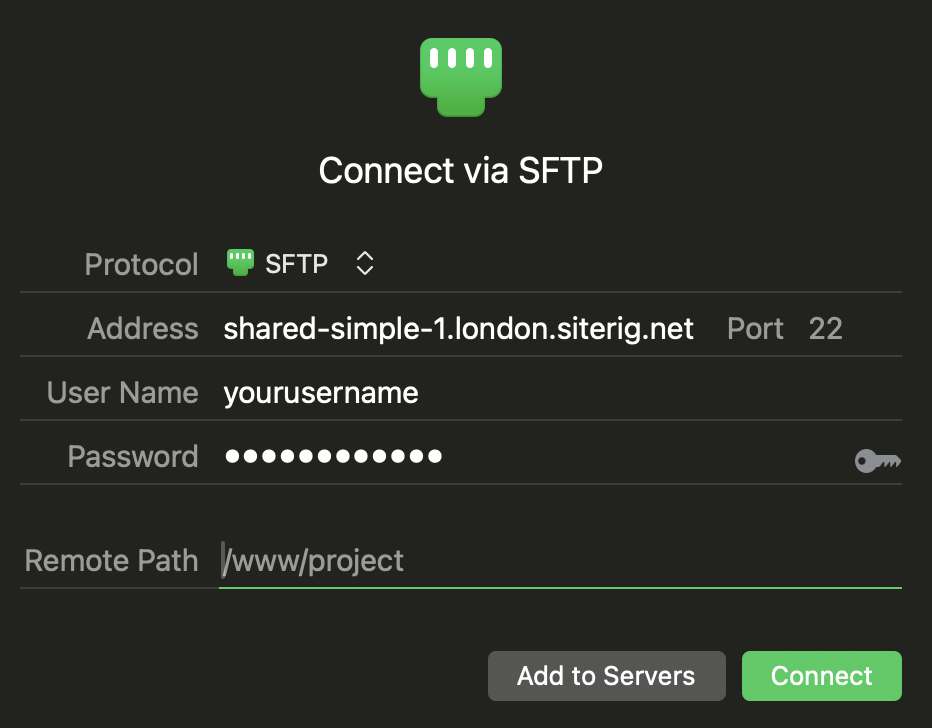
Connect dialog in Transmit
Once connected you can create, edit, or delete files and folders as well as downloading or uploading files to your space.